

What Is Double VPN (Multi-Hop) and How Do You Use It?

Most VPNs send your internet traffic through one server. Double VPN sends it through two. That extra step changes what your activity looks like to the outside world — and to anyone trying to trace it back to you.
It’s also one of the features people look for when deciding what counts as the best VPN setup for stronger privacy. This guide explains what Double VPN is, how it works, the real benefits and trade-offs, and when you actually need it.
What Is Double VPN in Simple Terms
Double VPN — sometimes called multi-hop VPN, VPN over VPN, or a layered VPN — is a security feature that routes your traffic through two VPN servers instead of one. Each hop adds extra encryption, so your data is sealed twice before reaching its destination.

Think of it as two locked boxes inside one another. The first hop unlocks the outer box but only sees a smaller, sealed box inside. The second VPN unlocks that inner box and forwards your request. Neither hop holds the full picture.
A single hop gives you one IP swap and one tunnel. A double VPN connection gives you two of each — an extra layer of protection between your identity and the websites you visit.
How Does Double VPN Work
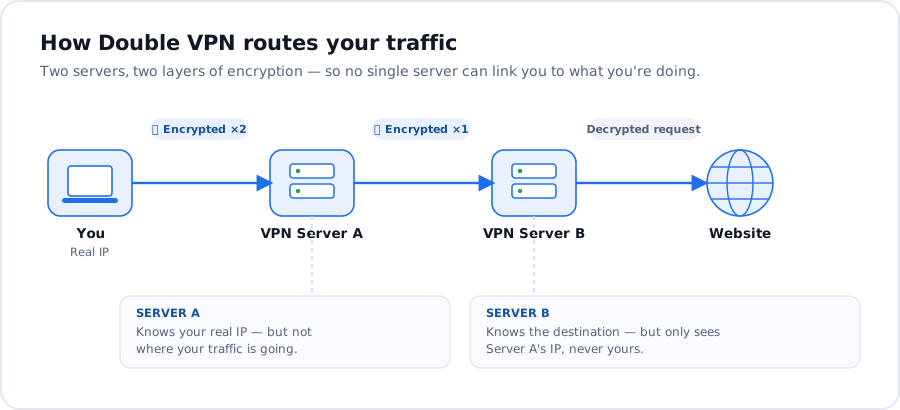
A double VPN routes traffic through two VPN servers located in different countries. Here’s what happens behind the scenes:
- Your device applies double encryption — two layers, one for each hop.
- The traffic reaches the first VPN server. It removes the outer layer but cannot read the still-sealed package inside. It knows your IP address but not your destination.
- The package moves to the second server, usually in a different jurisdiction.
- The second hop removes the final layer and forwards the request.
- The website sees only the exit IP, not yours.
The split is the point: one hop knows who you are but not where you’re going. The other knows where you’re going but not who you are.
This is also what people mean by VPN chaining — chaining tunnels so no single VPN server holds both ends.
Difference Between Double VPN and a Regular VPN
The difference comes down to three things:
- Servers: A regular VPN uses one VPN server. Double VPN uses two, ideally in separate jurisdictions.
- Encryption: A single hop applies one layer. Double VPNs encrypt your data twice, with each layer peeled off at a different point.
- Speed: Two hops mean more distance and more decryption work, so connection speed drops. A standard VPN keeps your internet speed closer to baseline; the double setup trades some speed for stronger privacy.
| Feature | Regular VPN | Double VPN (Multi-Hop) |
|---|---|---|
| Servers your traffic passes through | One | Two, in different locations |
| Layers of encryption | One | Two |
| Can any single server link your IP to your activity? | Yes — the server sees both | No — no single server sees both |
| IP shown to websites | The VPN server’s | The second server’s |
| Speed | Faster | A little slower (extra hop) |
| Best for | Everyday privacy, streaming, public Wi-Fi | Maximum privacy — sensitive work, journalists, high-risk regions |
Double VPN Benefits: What You Actually Get
The honest list of benefits worth knowing:
- Single-server compromise becomes a smaller problem. If one hop is breached, an attacker still only sees half the chain. Linking you to the destination would require access to both VPN servers, in two jurisdictions, at the same moment.
- Network observers get less to work with. Someone watching your home line sees traffic going to one country. Someone watching the destination sees traffic arriving from a different one. Correlating the two is much harder than tracing a single hop.
- Geographic separation adds legal distance. Two countries mean two legal systems between your activity and anyone trying to follow it.
An extra layer of security when sensitive data is in play. A double VPN provides an additional layer for sessions where one hop doesn’t feel like enough — research, source communication, journalism.
What Double VPN Does Not Do
Honest copy beats hype. Here’s what this setup won’t fix.
- It won’t anonymize accounts you log into. Sign into your email and that account is still yours. Double VPN hides the route, not the login.
- It won’t stop malware or phishing. Clicking a bad link is still clicking a bad link.
- It won’t speed anything up. A double VPN may also result in slower internet speed than a single hop. That’s the cost of an extra layer of encryption and another server.
It’s not built for streaming. A single hop usually streams more smoothly. Reach for Double VPN when privacy and extra security outweigh peak speed.
VPN Over VPN, Onion Over VPN, and Other Approaches
If you’re researching Double VPN, you’ve probably also seen Onion over VPN come up. A quick comparison.
- Tor: A free, volunteer-run onion network that routes traffic through three random nodes worldwide. Strong anonymity, but slow, and some services block known exit nodes.
- Onion over VPN: First you connect to a VPN, then your traffic enters Tor. Your provider can’t see your activity inside the network, and Tor entry nodes can’t see your real IP. It’s heavier than the double setup but useful when you want VPN privacy plus access to onion services.
- Double VPN: Two VPN servers run by the same VPN provider you’ve chosen. Faster than Tor, easier to use than the Onion combo, and the infrastructure is run by a company you can hold accountable through its no-logs policy.
Different sessions call for different tools.
Can You Set Up Multi-Hop Yourself?
Some users try to chain VPNs at home — for example, by trying to launch different VPN clients simultaneously, or running two VPNs at the same time using a router and a desktop app.
It works in theory. In practice, it’s messy: clients conflict, the second tunnel drops without warning, and you lose the protection of integrated kill switches and DNS leak prevention.
A proper Double VPN built into one app handles all of that for you. One toggle, two hops, no configuration headaches.
What to Look for in a Double VPN Service
Not every double VPN solution is built equally. A few things separate a serious VPN service from a marketing feature:
- A no-logs policy that holds up. If the provider keeps connection records, the second hop in the chain still ties back to you through their files. Look for a clear no-logs policy and, ideally, RAM-only infrastructure — these servers don’t write data to disk, so each session leaves no trace.
- Servers located in different countries. Two hops in the same jurisdiction defeat half the point. The chain should cross borders.
- Strong, modern encryption. Reliable protection on both hops, paired with a well-audited protocol like WireGuard or OpenVPN.
- A kill switch. If either hop drops, the kill switch cuts your internet so your real IP doesn’t leak. With more moving parts in a double setup, this matters more, not less.
- Independence from international surveillance alliances. A provider headquartered outside major data-sharing alliances has more legal room to honor its policy.
Do You Need Double VPN?
The honest answer: most people don’t for everyday browsing. A single hop with strong encryption and a strict no-logs policy covers the threat model for streaming, shopping, public Wi-Fi, and keeping your internet provider out of your activity.
The double setup makes sense when the situation calls for it:
- Researching sensitive topics where you’d rather not leave a clean trail
- Communicating with sources or contacts who need distance from your identity
- Working from a network where a single hop gets scrutinized
- Any session where two layers feel right and one doesn’t
If you’re not sure, start with a single hop. Switch to the double when the moment asks for it.
How Planet VPN Does Double VPN
Planet VPN includes Double VPN on Premium. A few things shape how it works in practice.
- RAM-only servers. Every session runs on memory-only infrastructure. Nothing is written to disk, so when your session ends, the data is gone.
- Romanian jurisdiction. Planet VPN is registered in Romania, outside major international surveillance alliances. The legal framework supports the no-logs policy that the technical setup makes possible.
- One-tap activation. No fiddling with two VPN clients, no manual routing. The Double VPN feature is built into the app — open it, pick Double VPN, choose your entry and exit locations, connect.
- Kill switch on every connection. If either hop drops, your traffic stops too. Your real IP stays where it belongs — on your device, not on the open internet.
The Bottom Line
Double VPN is multi-hop privacy made simple: two servers, two layers of encryption, two jurisdictions between you and the sites you visit. It’s not a magic cloak, and it’s not right for every session — but when you need stronger privacy and security than a single hop provides,
Double VPN is the next step up.
For most everyday use, one hop with a strict no-logs policy is enough. For the moments when “enough” isn’t, Planet VPN’s Double VPN is one tap away inside Premium.

Frequently Asked Questions
Is Double VPN safer than a single hop?
Double VPN is safer against single-server compromise and network-level correlation. It’s not safer in an absolute sense — it adds a layer, it doesn’t replace good security habits.
Will it slow my connection?
Yes. Two hops, two layers, longer distance — your speed will drop compared with a single hop. Picking a first hop close to you helps.
Can I use Double VPN for streaming?
You can, but a single hop usually streams more smoothly. The double setup is designed for privacy-first sessions.
Does Double VPN hide my IP completely?
The destination sees only the exit hop’s address. Your real IP never reaches the website. Your VPN provider sees only the first hop.
Is it the same as VPN over VPN or VPN chaining?
Different names for similar ideas. Those phrases describe the technique. Double VPN is the productized version inside a single app.
Do I need it if I already use a no-logs VPN?
For most everyday use, no. A no-logs single hop covers the basics. Reach for the double setup when your threat model goes beyond everyday browsing.