

Proxy vs VPN: What’s the Difference and Which Should You Use?

Proxy vs VPN: the short answer
A proxy is a middleman server that hides your IP address for a single app or browser, usually without encryption. A VPN is an encrypted tunnel that protects every connection coming out of your device — not just one app.
Both tools mask your real IP from the websites you visit. The real difference comes down to two things: scope and encryption. A proxy moves your traffic; a VPN encrypts and moves it. That makes proxies marginally faster, and VPNs significantly more private.
Quick pick: just need to swap your IP for one task → proxy. Want privacy on every app, especially on public Wi-Fi → VPN.

What is a proxy server?
A proxy server is an intermediary computer that sits between your device and the wider internet. When you configure an app to use a proxy, your web requests go to the proxy first; the proxy forwards them to the destination, and the responses come back the same way. From the website’s point of view, the traffic looks like it came from the proxy’s IP address — not yours.
Proxies operate at the application layer. That means they only handle traffic from the app you’ve configured to use them. Set up a proxy in Firefox’s network settings, and Firefox alone routes through it — your email client and any other apps keep using your real IP.
One quick note on terminology: the word proxy gets used in two slightly different ways. It can mean the tool that does the routing (an HTTP proxy you configure in your browser, a SOCKS5 client, a script using a proxy library), and it can mean the website that does the routing for you — a “web proxy” you simply visit, paste a URL into, and use without installing anything. The underlying idea is identical; the practical difference is whether you set it up or just open a browser tab.
Most consumer proxies are set up at the browser level or as a small extension. Free public proxies are popular but rarely safe: in a widely cited 2015 audit of more than 400 free proxies, security researcher Christian Haschek found that about 79% were unsafe, with many actively modifying traffic or stripping HTTPS.
For a deeper look at every proxy variant, see our full guide to proxy types.
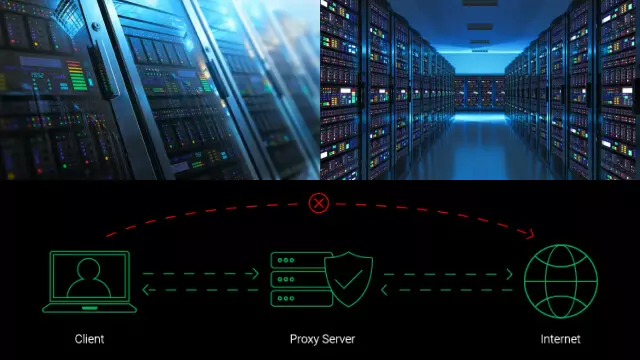
Common types of proxies
Not all proxies are the same. These are the ones a regular user is most likely to meet.
HTTP / HTTPS proxy
The most common consumer proxy. Configured at the browser level and used for plain web traffic. An HTTPS proxy adds transport encryption between you and the proxy server, but anything beyond it travels however the destination site is set up.
SOCKS5 proxy
A more flexible protocol. SOCKS5 works for anything that runs over TCP, not just web pages — many torrent clients support it specifically. It’s defined in IETF RFC 1928 and typically runs on port 1080.
Transparent proxy
Sits between you and the internet without you configuring it. Schools, offices, hotels, and many public Wi-Fi hotspots run them for filtering and caching. A transparent proxy doesn’t hide your identity — it watches.
Anonymous and elite proxies
An anonymous proxy hides your IP from the destination site but still announces itself as a proxy in the request headers. “Elite” or “high anonymity” proxies hide both — the IP and the fact that a proxy is in use.
Residential proxy
Routes your traffic through a real home internet connection. Harder for sites to detect as a proxy, but residential proxies are usually paid services and noticeably slower than other types. They’re also the type most often reached for when a site is actively blocking known VPN IPs — a residential IP looks like an ordinary home connection rather than a server.
Datacenter proxy
The opposite trade-off: cheap, fast, and easy to spin up — but also easy for sites to identify and block, because the IP ranges are public.
DNS proxy
A DNS proxy intercepts your DNS lookups and routes them through its own resolver, which can change what region a website thinks you’re in (some streaming services geo-locate by DNS alone). It doesn’t hide your real IP from the destination and doesn’t encrypt your traffic — a VPN does both.
Web (CGI) proxy
A website where you paste a URL and the page loads inside it. No software setup needed. Services like CroxyProxy work this way — you open the proxy site, type the address you want to visit, and the page loads inside the proxy. Convenient for one-off use, but performance varies and some modern features (logins, embedded video, complex single-page apps) don’t always work properly through them.
Forward vs reverse proxy
A forward proxy sits in front of clients — the kind discussed above. A reverse proxy sits in front of a website’s own servers and protects them. As a regular user you’ll only ever interact with forward proxies; reverse proxies are infrastructure.
Who actually uses proxies?
Proxies serve three loosely defined audiences, and the kind of proxy each group picks looks very different in practice. Everyday users mostly want a quick IP change — to read a geo-blocked article, get past a workplace filter, or load a site that blocks known VPN exit IPs. A free in-browser web proxy (the kind described above) is usually enough.
Beyond that, proxies become a working tool. Developers running scraping scripts, traffic arbitrageurs and ad-verification freelancers, bot operators, and small market-research teams rent pay-as-you-go residential or mobile IPs from services such as ProxyJet, usually at a few dollars per gigabyte. At enterprise scale, organizations running price intelligence, brand protection, SEO monitoring across geos, or AI training-data collection buy from NetNut — volume-based contracts that run into terabytes a month.
What is a VPN?
A VPN — virtual private network — is software that builds an encrypted tunnel between your device and a remote server run by the VPN provider. Every piece of internet traffic leaving your device, from any app, goes through that tunnel. The websites and services you connect to see the IP address of the VPN server, not your real one.
Unlike a proxy, a VPN works at the operating system level. Once it’s connected, it covers every app: your browser, your messaging apps, your background sync, your games. That’s the cleanest one-line difference between the two tools.
Modern VPNs use industry-standard encryption — typically AES-256, the symmetric cipher specified in NIST FIPS 197 — combined with a tunneling protocol such as WireGuard, OpenVPN, or IKEv2/IPsec. WireGuard is the newest of the three and is what most providers default to today because it’s faster and has a much smaller codebase to audit. For more, see our overview of VPN protocols.
The other piece of the privacy promise is policy: a reputable provider operates under a no-logs policy, meaning the provider itself doesn’t keep records of which sites you visit through the tunnel.
On the user side, VPNs are overwhelmingly a consumer tool — used to protect personal traffic on public Wi-Fi, reach geo-restricted content, and keep ISPs out of browsing history. Companies also run their own VPNs to give remote employees access to internal systems, but that’s a separate enterprise use case that doesn’t change how the technology works on a personal device.
Proxy vs VPN: side-by-side comparison
Both tools change the IP that websites see — that’s where the similarity ends. The table below lays out the practical differences row by row. If you only read one section of this article, read this one.
| Feature | Proxy | VPN |
| Encryption | Usually none; HTTPS and SOCKS5 add transport encryption only | Yes, end-to-end (typically AES-256) |
| Scope of protection | Single app or browser | Whole device, every app |
| IP masking | Hides your IP from sites you visit | Hides your IP and encrypts your traffic |
| Privacy from ISP | No — your ISP still sees your traffic | Yes — ISP sees only encrypted traffic to the VPN server |
| Speed | Typically faster (no encryption overhead) | Slight slowdown; depends on protocol and server distance |
| Setup | Manual per-app configuration | Install one app, click connect |
| Cost | Many free options, but most are unsafe | Paid subscriptions; some legitimate free tiers exist |
| Best for | Quick IP swap, light geo-unblocking, web scraping | Privacy, public Wi-Fi, streaming, torrenting, full-device protection |
The next section walks through each row in more detail.
Key differences between a proxy and a VPN
Encryption
This is the single biggest difference. A standard proxy doesn’t encrypt your traffic — it just relays it. HTTPS and SOCKS5 proxies can add a layer of transport encryption between your device and the proxy, but anything beyond the proxy travels in the clear unless the destination site itself uses HTTPS. A VPN, by contrast, encrypts everything leaving your device end-to-end with the VPN server. Most consumer VPNs use AES-256 or ChaCha20 (the cipher WireGuard uses), both of which are widely considered unbroken in the public cryptographic literature.
Scope of protection
A proxy protects whatever app you set it on. A VPN protects every connection that leaves the device. That’s why a proxy in your browser doesn’t help if your email client or a chat app phones home in the background — those still leak. With a VPN, they don’t.
Privacy and anonymity
A proxy hides your IP from the destination site, but your internet provider still sees what you’re doing and where you’re going (the proxy IP, and the domain through SNI). A VPN’s encrypted tunnel hides the destination from your ISP — the ISP sees only that you’re connected to the VPN. For that privacy to mean anything in practice, the provider has to operate a no-logs policy, ideally backed by an independent audit.
Speed and performance
Proxies have a small speed advantage because they don’t encrypt anything. The encryption overhead on a modern VPN is real but small: public WireGuard benchmarks typically show throughput within roughly 10% of a direct connection on a same-region server. OpenVPN, the older standard, is noticeably slower. The bigger factor for VPN speed is geography — a server two continents away will be slower than the fastest free proxy. A server in your own country usually won’t be.
Cost
Most free public proxies are run by people with a reason to run them. That reason is often data harvesting or ad injection. Paid proxy services exist (residential proxies in particular are almost always paid). Quality VPNs are typically a paid subscription, but a few providers run real free VPN servers as a way to onboard paid users — the trade-off being fewer locations and sometimes a bandwidth limit.
The short version: proxies are lighter and cheaper for casual use; VPNs are the right tool whenever privacy or security is part of the requirement.
When to use a proxy
There are clear situations where a proxy is the right call:
- You need a quick IP swap for one specific task in one specific app.
- You want to access lightly geo-restricted content where security isn’t part of the question.
- You’re doing market research, price comparison, or web scraping where you rotate through IPs but don’t care about traffic encryption.
- You’re on a network that requires a proxy — many schools, offices, and hotel Wi-Fi captive portals run transparent proxies you can’t opt out of.
If any of those involve handling sensitive data — banking, logging into accounts, anything personal — skip to the VPN section instead.
When to use a VPN
A VPN is the better tool any time at least one of these applies:
- You’re using public Wi-Fi at a cafe, airport, or hotel, where other users on the same network can intercept anything that isn’t encrypted.
- You want privacy from your ISP — what you stream, search, and download.
- You’re streaming geo-restricted content where the site actively detects and blocks proxy IPs (most large streamers do).
- You torrent and want encrypted traffic plus IP protection.
- You’re traveling somewhere with heavy internet censorship.
- You want every app on your phone or laptop covered, not just one browser. This matters more on mobile, where dozens of apps make connections you never see.
If any of these describe your situation, a VPN is the right choice.
Can you use a proxy and a VPN together?
Technically, yes. Practically, for most people, it’s not worth it. A setup that stacks a proxy on top of a VPN adds configuration complexity and slows down your connection without adding meaningful privacy on top of what the VPN already gives you.
There’s one case where the combination is genuinely useful: you want the broad protection of a VPN, but you also want a single app or browser to come out somewhere different from your VPN exit. You’d point that app at a proxy, while the VPN protects everything else. That’s narrow and specialist — typically only relevant for testing, research, or specific geo-spoofing inside a session.
If you only pick one, pick a VPN.
Free proxy vs free VPN: which is safer?
Both categories include junk. The pattern is just slightly different.
Most free public proxies make their money by interfering with the traffic that goes through them. Independent audits going back at least a decade have found that a large share — around 79% in a widely cited 2015 study — actively modified content, stripped HTTPS, or injected ads. The economic incentive hasn’t changed since.
Free VPNs are more of a mixed bag. A 2016 study by CSIRO and UC Berkeley of 283 free Android VPN apps found that 38% contained malware or malvertising, 75% used third-party tracking libraries, and 18% didn’t actually encrypt traffic at all. But the same study also identified a separate category: legitimate free tiers run by established VPN companies as a way to onboard paying users. Those operate under the same security model as the paid product.
If you’re going to use a free privacy tool, check it against this list before you trust it:
- A clear, public no-logs policy — ideally backed by an independent audit.
- A real corporate identity and jurisdiction stated on the site, not a shell with no address.
- An installable app, not just a browser extension that scrapes your data.
- A plausible explanation of how the free tier is funded (paid upgrades, not selling traffic).
- Working DNS leak protection and a kill switch — at minimum on the paid tier.
If you’d use a free proxy for casual privacy, a trustworthy free VPN gives you encryption on top — just verify the provider first.
So which should you choose, a proxy or a VPN?
There are many different types of proxies, each built for a specific need. Proxies are usually faster because they skip encryption — and for tasks that don’t involve any privacy stakes, that speed and simplicity can be exactly what you want. But the moment privacy matters — public Wi-Fi, streaming, torrenting, mobile browsing, anything personal — a VPN is the right tool, because it encrypts everything your device sends and receives, not just one browser tab.
If you’ve decided a VPN is the right fit for you, Planet VPN is worth a look. It runs a free tier with five server locations, no traffic or bandwidth limit, and no registration required, using the same encryption standards as the paid plan. The paid plan adds more locations and faster servers if you need them.
Short version: proxy for a quick IP swap, VPN for actual privacy.
Frequently asked questions about proxies and VPNs
1. What’s the main difference between a proxy and a VPN?
A proxy hides your IP address for one app or browser and usually doesn’t encrypt your traffic. A VPN encrypts every connection from your whole device and routes it through a remote server. In practice that means a VPN protects you from your ISP, on public Wi-Fi, and across every app on the device — a proxy doesn’t.
2. Is a VPN a proxy?
Technically a VPN is a kind of proxy, because both work by routing your traffic through a remote server. The difference is that a VPN adds full encryption and protects every app on your device, while a normal proxy doesn’t encrypt and only covers the one app you configured.
3. Is a proxy or a VPN better for security and privacy?
A VPN. Proxies hide your IP from the websites you visit, but they don’t encrypt your traffic, so your ISP and anyone on the same Wi-Fi network can still see what you’re doing. A VPN encrypts everything end-to-end with the VPN server, which closes that gap.
4. Can I use a VPN and a proxy at the same time?
Yes — but for most users it adds setup complexity and slows down your connection without meaningfully improving privacy. The narrow exception is when you want one specific app to exit somewhere different from your VPN. Otherwise, just use the VPN.
5. Do I need a proxy if I have a VPN?
Usually no. A VPN already hides your IP, lets you change region, and adds encryption a proxy doesn’t have. A proxy is only worth adding for a narrow app-level use case where you specifically need a different IP for that one app.
6. Is a proxy or a VPN better for torrenting?
A VPN. BitTorrent traffic exposes your IP to every peer in the swarm. A VPN replaces your IP with the server’s and encrypts the traffic so your ISP can’t see what you’re downloading either. Standard proxies don’t encrypt, and many torrent clients ignore proxy settings on certain traffic types — leading to leaks.
7. What’s the difference between SOCKS5 and a VPN?
SOCKS5 is a flexible proxy protocol (defined in RFC 1928) that can handle anything running over TCP — torrents, games, web traffic. It doesn’t encrypt traffic itself; encryption depends on what’s running on top. A VPN encrypts everything and covers the whole device, so it’s broader and more protective. SOCKS5 is the right pick only when you specifically want app-level routing without device-wide coverage.
8. Tor vs VPN vs proxy — what’s the difference?
Tor routes your traffic through three volunteer-run servers (“nodes”), encrypting it at each hop. It offers the strongest anonymity of the three but is significantly slower than either alternative. A VPN routes through one server you trust, with encryption end-to-end — balanced privacy and speed. A proxy is the lightest of the three: one hop, no built-in encryption.
9. Are free proxies safe?
Most free public proxies aren’t. Independent audits have found large shares of them actively modify content, strip HTTPS, or inject ads. If you need a free privacy tool, a reputable free VPN tier is a safer default — and easier to verify, because there’s an identifiable company behind it.

10. Will a VPN slow down my internet?
A small amount. Encryption adds overhead, and routing through a remote server adds latency. With WireGuard on a server in the same region, the slowdown is usually under 10%. The biggest factors are distance to the server and server load, not the encryption itself.
11. Is a VPN or proxy better for watching adult content?
A VPN. The same reasons that apply to general privacy apply here — a VPN encrypts your traffic so your ISP can’t see what you’re streaming, and it covers the whole device rather than one browser. In countries that restrict adult sites, a VPN also tends to work where simple proxies are detected and blocked.
12. Is a VPN or proxy better for gaming?
It depends on what you’re trying to do. For accessing region-locked games or lowering ping to a specific game region, either tool can work, though a SOCKS5 proxy is slightly faster because it doesn’t encrypt. For protecting yourself from DDoS attacks during online play, a VPN is the safer choice — it hides your real IP from other players and adds an encrypted layer. Most casual gamers don’t need either.