

What is a VPN and How to Use a VPN?

A VPN hides your IP address and encrypts everything your device sends — so your internet provider, the websites you visit, and anyone sharing your Wi-Fi can’t see what you’re doing online. This guide covers what a VPN is, what it protects (and what it doesn’t), why you’d want one, and how to set one up in about two minutes.
What is a VPN?
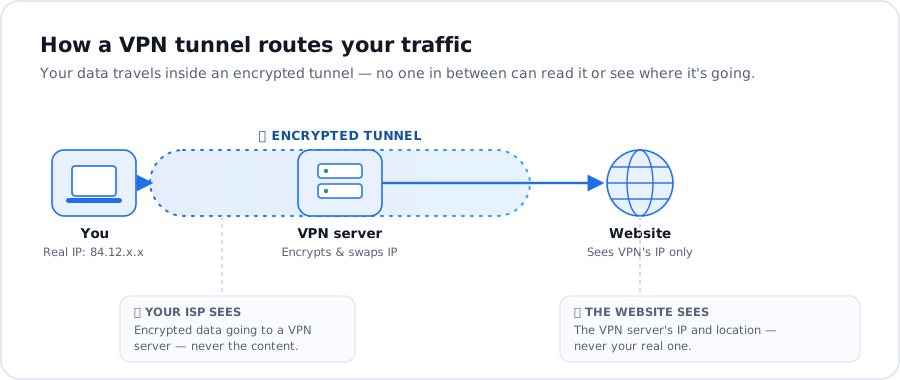
VPN stands for Virtual Private Network. It’s a service that creates an encrypted “tunnel” between your device and a server run by the VPN provider. Everything you send — the sites you load, the apps you use, the files you download — travels through that tunnel in a scrambled form that no one along the way can read.
Two things happen the moment you connect. First, your traffic is encrypted, so your internet provider, network admins, and anyone snooping on public Wi-Fi see only unreadable data. Second, your real IP address is replaced with the VPN server’s, so the websites you visit see that server’s location instead of yours. In plain terms: a VPN makes your connection private and changes where you appear to be.

What a VPN hides — and what it doesn’t
It helps to be clear on both, because a VPN is powerful but it isn’t magic.
What a VPN hides
- Your IP address and location — websites and apps see the VPN server’s, not yours.
- Your activity from your ISP — they can see you’re connected to a VPN, but not which sites you open or what you do there.
- Your data on shared networks — on public or hotel Wi-Fi, encryption keeps others on the network from intercepting what you send.
What a VPN doesn’t do
- It doesn’t make you completely anonymous. If you log into an account, that service still knows it’s you. A VPN protects the connection, not your identity on sites you sign in to.
- It doesn’t block ads, trackers, or malware on its own. Pair it with a tracker/ad blocker and good security habits.
- It can slightly slow your connection. Routing through an extra server adds a little overhead — with a fast provider and a nearby server, most people won’t notice.
Why use a VPN?
A few everyday reasons people turn one on:
- Browse privately. Keep your IP address and browsing away from your ISP and the sites you visit.
- Stay safe on public Wi-Fi. Encryption protects your logins and payments on café, airport, and hotel networks.
- Reach blocked or geo-restricted content. Connect through another country to open sites and streaming libraries that aren’t available where you are.
- Avoid price and profiling based on location. Some sites tailor prices and results to where you appear to be.
How to set up and use a VPN
Getting started takes a couple of minutes:
- Choose a provider and install the app. Planet VPN has apps for every major platform — Windows, macOS, Android, iOS and browsers — and a free plan you can start on right away.
- Open the app and connect. Tap the connect button and the app picks the fastest nearby server automatically. It usually takes a few seconds to establish the tunnel.
- Or pick a specific country. Want content from another region? Choose that country from the server list before connecting.
- Browse as normal. Once it says “connected,” everything is running through the VPN — no other setup needed.
Turning it off
Just tap disconnect in the app whenever you want to go back to your normal connection.
How to check your VPN is working
Search “what is my IP” before and after connecting. If the IP address and country change after you connect, your VPN is doing its job. You can also confirm the country matches the server you selected.
Is a VPN legal, safe, and free?
Legal: In most countries, using a VPN is completely legal. A handful of governments restrict or ban them, so if you’re travelling somewhere with heavy internet censorship, check local rules first. Using a VPN doesn’t make otherwise-illegal activity legal.
Safe: A reputable VPN is one of the simplest ways to make your connection more secure. The key is trusting your provider, since your traffic passes through their servers — choose one with a clear privacy policy rather than an unknown app.

Free: Yes, good free VPNs exist. Planet VPN offers a free plan alongside its premium tier, works across all your devices, and supports P2P and torrent traffic. Free tiers are a great way to try a VPN before deciding whether you need the extra speed and server choice of a paid plan.
Frequently asked questions
What is a VPN and why do I need one?
A VPN encrypts your connection and hides your IP address. People use one to browse privately, stay safe on public Wi-Fi, and reach content that’s blocked in their region.
Can I be tracked if I use a VPN?
Ordinary trackers and websites can’t tie activity back to your real IP while you’re connected. Determined, well-resourced actors can still use other signals, and anything you log into still knows it’s you — so a VPN is strong privacy, not total anonymity.
Does a VPN slow down my internet?
A little, because your traffic takes an extra hop through the VPN server. With a fast provider and a nearby server, the difference is usually small enough that you won’t notice it for browsing or streaming.
Is it legal to use a VPN?
In most countries, yes. A few restrict them, so check the rules if you’re in or travelling to a country with strict internet controls.
Is a free VPN safe to use?
A free plan from a trustworthy provider is safe. Be cautious with unknown free apps that may log or sell your data — stick with a provider that publishes a clear privacy policy.