

What Is a VPN and What Does It Do?

Every time you connect to the internet, you leave a trail — your IP address, your browsing activity, and your personal data are all visible to your internet service provider, advertisers, and anyone else positioned to intercept your traffic. A VPN, or Virtual Private Network, is the tool most widely used to change that.
It encrypts your connection, masks your real IP address, and routes your internet traffic through a secure server, keeping your online activity private from outside observers. This guide covers what is a VPN, how it works, and how to choose the right one.
Defining VPN
VPN stands for Virtual Private Network — a technology that creates a secure, encrypted connection between your device and the internet. At its core, a VPN is a private network that routes your traffic through a remote server, masking your real IP address and shielding your sensitive data from anyone who might be watching.

The VPN’s meaning is fairly straightforward once you break down the name. “Virtual” because it creates a simulated private connection over a public network. “Private” because your activity is encrypted and hidden from outside observers. “Network” because it connects multiple points — your device, the VPN server, and the wider internet — as if they were all part of the same secure system.
Understanding VPN: A Complete Overview
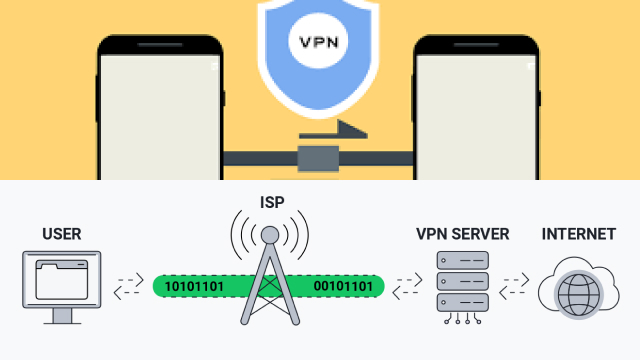
A VPN establishes a protected pathway between your device and the VPN server. When you connect, all your internet traffic passes through this encrypted tunnel before reaching its destination. To anyone observing your connection from the outside — your internet service provider, a hacker on the same public Wi-Fi network, or a government surveillance program — your traffic appears as unreadable, encrypted data originating from the VPN server’s IP address rather than your own.
This is fundamentally different from simply browsing the web without protection. Without a VPN, your ISP can see every website you visit, every file you download, and every message you send over unencrypted channels. Your browsing history becomes a record accessible to your internet service provider, advertisers, and potentially law enforcement. A VPN connection changes this dynamic entirely.
Modern VPN technology has evolved considerably. Early VPNs were largely enterprise tools built for corporate network access. Today, the personal VPN market serves millions of individuals who use VPNs to protect their privacy, access content, and secure their connections on the go. Advances in VPN technology have made these tools faster, easier to use, and more widely available than ever before.
How VPN Services Work
When you launch a VPN app and connect to a server, your device and the VPN server perform a handshake — exchanging cryptographic keys that will be used to encrypt and decrypt your traffic. This process creates the encrypted tunnel through which all your internet traffic will flow.
Your data is encrypted on your device before it’s transmitted. It travels through the VPN tunnel to the remote server, where it’s decrypted and sent on to its destination — a website, an app’s backend, a streaming service. The response follows the same path in reverse: encrypted by the server, transmitted through the tunnel, and decrypted on your device.
From the perspective of any website you visit, the connection appears to come from the VPN server’s IP address, not your own. Your ISP can see that you’re connected to a VPN server, but cannot see what you’re doing within that encrypted connection. The internet traffic that flows through the VPN appears as meaningless encrypted data to anyone attempting to intercept it.
The VPN client on your device handles all of this automatically. You connect, and from that point forward, your connection is secured. VPN software today is designed to be simple and accessible, even for users with no technical background.
Benefits of VPN: Security, Anonymity, and More
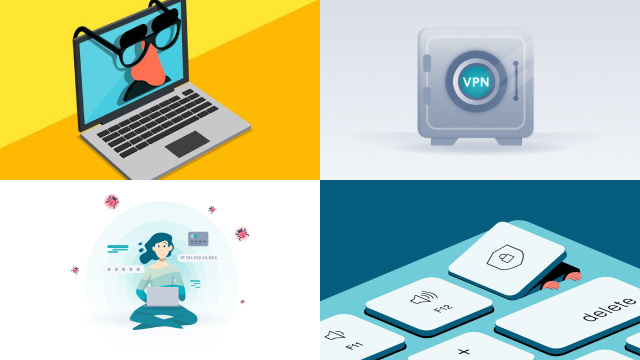
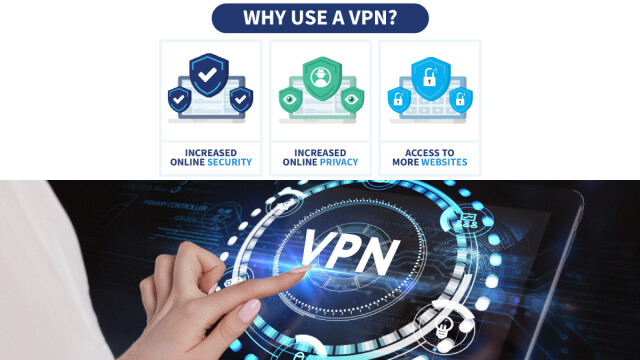
VPNs deliver value across several dimensions simultaneously. The most widely understood benefit is security — specifically, the protection of your data through encryption. When you connect to a VPN, your internet traffic is encrypted using robust algorithms that would take modern computers an impractical amount of time to crack. This encrypted data is essentially unreadable to anyone who intercepts it in transit.
Closely related is anonymity. A VPN hides your real IP address, replacing it with the IP address of the VPN server. This prevents websites, advertisers, and other third parties from using your IP address to identify or track you. While no VPN makes you fully anonymous — other browser-based tracking methods still exist — it significantly raises the bar for anyone trying to profile your online behavior.
VPNs also enable geographic flexibility. Because your connection appears to originate from the VPN server’s location, you can access content that’s restricted in your actual location. This is especially useful for travelers who want to access services from their home country, or for anyone seeking a broader range of content options.
For remote workers, a VPN provides secure access to office networks and company resources. A remote-access VPN creates a secure channel between a remote employee’s device and the corporate network, as if they were physically sitting in the office.
Using VPN services on public Wi-Fi networks is one of the most practical use cases. The encrypted connection a VPN provides makes it much harder for attackers on the same network to intercept your data, even if the network itself is unsecured.
Common VPN Use Cases
VPNs serve a wide range of personal and professional purposes. Here are the most common reasons people use them:
- Remote work: Employees working remotely use VPNs to securely access corporate networks, files, and tools over the public internet — as if they were physically in the office.
- Public Wi-Fi security: A VPN shields your data from others on the same network, whether you’re checking email at an airport or banking at a hotel.
- ISP privacy: A VPN limits what your internet service provider can observe, preventing them from monitoring or selling your browsing history.
- Avoiding geo-restrictions: Travelers use VPNs to access streaming services, news sites, and platforms that are geo-restricted or censored in the country they’re visiting.
- Business networking: Companies use site-to-site VPNs to securely link offices in different locations, sharing resources without routing sensitive data through the open internet.
How to Choose the Best VPN Provider
Choosing a VPN means choosing a company to handle the security and privacy of your internet traffic — so the decision deserves careful thought. Here’s what to look for:
- Strong encryption and modern protocols: Look for support for WireGuard and OpenVPN. Both are well-audited and reliable; avoid providers that rely on outdated protocols like PPTP.
- A verified no-logs policy: The provider should not record your IP address, browsing activity, or connection timestamps — ideally confirmed by an independent third-party audit.
- Favorable jurisdiction: Providers headquartered outside major intelligence-sharing alliances face fewer legal obligations to hand over user data.
- A kill switch: Kill switch feature cuts your internet connection if the VPN drops, preventing your real IP address from being exposed during a reconnection gap.
- Fit for your use case: Consider server count, speed, device support, and ease of use. A secure VPN you find difficult to use is one you won’t use consistently.
General Guide to Setting up a VPN
Setting up a VPN is more straightforward than most people expect. Here’s a general walkthrough of how to get started.
Start by selecting a VPN provider that fits your needs and signing up for a plan. Most reputable providers offer apps for all major platforms — Windows, macOS, iOS, Android, and sometimes Linux. Download and install the VPN app for your device. This is how you install a VPN on most consumer platforms; the app handles all the configuration automatically.
Once installed, open the app and sign in with your account credentials. You’ll typically be presented with a server list or a quick-connect button that selects the best available server automatically. Choose a server in the location you want — your home country if you’re traveling, or simply the nearest location for the best speed.
Click connect. The VPN establishes an encrypted connection to the server, and from that point on, your internet traffic is routed through the VPN tunnel. Most apps display a clear indicator showing that the VPN connection is active.
To disconnect, open the app and click disconnect. Your traffic will then route normally through your regular ISP connection.
For ongoing use, consider enabling features like the kill switch and auto-connect on untrusted networks. These settings vary by VPN client, but are typically found in the app’s settings menu. On mobile, a VPN app functions the same way — connect before using public Wi-Fi or whenever you want the protection of a VPN gateway.
Why Pick Planet VPN?
Planet VPN brings together the essential qualities of a trustworthy VPN solution in a package that’s accessible to everyday users. A strong no-logs policy, support for modern VPN protocols, and servers in dozens of countries give you both protection and flexibility. The VPN shields your real IP address, encrypts your internet traffic, and keeps your browsing history private from your ISP and third parties.

Whether you need a VPN for daily privacy, remote work, or staying secure on public Wi-Fi networks, Planet VPN offers the features that matter. The straightforward app makes using VPN simple across all your devices, while the underlying security holds up to scrutiny. For anyone looking for a reliable VPN that doesn’t compromise on privacy, Planet VPN is worth serious consideration.
FAQ
What is VPN and why use it?
VPN stands for Virtual Private Network. It’s a service that encrypts your internet connection and routes it through a remote server, hiding your real IP address and protecting your data from outside observers.
How do I get a VPN?
To get a VPN, choose a provider, sign up for a plan, and download their app on your device. Most VPN services offer apps for all major platforms. Once you install a VPN app and log in, you can connect to a server with a single tap or click.
Can I use a VPN for free?
Free VPN options exist, but they come with meaningful limitations. Free VPN services typically restrict data usage, offer fewer server locations, and may have slower speeds. More importantly, some free VPNs monetize their services by logging and selling user data — the opposite of the privacy benefit you’re seeking. For regular, reliable VPN use, a paid VPN from a reputable provider is generally a better choice.
How do I turn on VPN?
Open your VPN app, select a server or use the auto-connect option, and tap or click the connect button. The app will indicate when the VPN connection is active. To turn it off, open the app again and disconnect.
Is it legal to use a VPN?
In most countries, using a VPN is completely legal. VPNs are widely used by businesses and individuals for legitimate security and privacy purposes. A small number of countries restrict or prohibit VPN use, so it’s worth checking local regulations if you’re traveling.